Mike Rooney

programming and philosophy

Gnome Do 0.8 Released; Awesomeness Ensues!

| Comments

Gnome Do 0.8 has just been released! If you don’t know anything about Do, I HIGHLY recommend that you check it out. It is a magical launcher inspired by Quicksilver that is super powerful, plugin-rich, intuitive, and rather polished.

The 0.8 release added a bunch of bling in the form of smooth animations and more attractive interfaces. One of the most interesting aspects about the release, however, is the addition of a Dock interface called Docky:
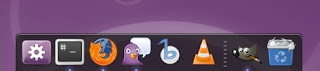


At first glance it appears to be just yet another Linux dock and a random feature for Do to add. However the dock is actually automatically and dynamically populated based on your most launched applications in Do. You can also add and remove launchers by dragging them to and from the dock. This would be cool enough, but it doesn’t stop there because Docky is a first-class Do interface where you can perform all your actions!



Oh yeah, and it features a silky smooth parabolic zoom. Instead of repeating what the developers have already said better themselves, let me link you to their blog posts. If you want to get Do, check out the first link which is the official release announcement (or skip right to the PPA :). For more in-depth information, I highly recommend jassmith’s post who was the main Docky developer. Happing Do-ing, and don’t forget to Digg it!

Release announcement: http://do.davebsd.com/release.shtml
jassmith: http://jassmith.wordpress.com/2009/01/29/gnomedo080release/
pengdeng: http://b.pengdeng.com/2009/01/do-08-rock-out-with-your-dock-out.html

Comments

kiss
This comment has been removed by a blog administrator.
Michael
Janne, Docky doesn’t have to take up any screen real estate, and I prefer that it doesn’t. Just right-click on the Do icon in the left of Docky and enable “Allow Window Overlap”. This will make Docky behave like most docks and give you that bottom area back.
Tomasz ‘Zen’ Napierała
Im using gnome-do since it’s beggining, but now I cant use themes without using compiz :( I cant use compiz, so do’s usability is kinda limited for me, especially while default theme is to big and doesn’t fot to my desktop.
Janne Morén
Thanks; didn’t know you could resize it.

Still not an option though, as I only have room for one panel; with a 1024x768 size screen, two panels already eat too much into my screen estate. So until/if Docky becomes a full replacement I’ll do without. Gnome DO works perfectly fine without it after all.
Michael
Hi Janne! You can grab the divider between your launchers and trash to size Docky vertically, and to resize it horizontally you can grab either end.

When using Docky, I would recommend removing the bottom panel, as it becomes rather unnecessary and is what most docks anticipate. If there are any panel applets you miss, just add them to the top panel!
Janne Morén
Gnome DO is really nice; you just made me start using it.

However, the Docky interface is a dud for me. It obscures my normal panel, and it is way, way, _waaayyy_ too big, with no way to make is smaller or move it away from the bottom. Did I mention just how humongous that Docky thing is?

Also, the Evolution contacts search plugin doesn’t seem to work; a shame as that could come in really useful.

Other than that, though, it really seems to be a pretty useful app, and I intend to keep using it for now.

New Laptop on the Way: Dell XPS M1330!

| Comments

NOTE: If you are looking for a good deal on a refurbished Dell XPS M1330 (and maybe 1530), read on!

My current and only machine is a 4.5 year old 15.4” laptop. It’s held up surprisingly well, but a Pentium M just isn’t cutting it anymore and I really want a smaller and lighter form factor. I had been eying 13” Dells for quite awhile (the XPS and Inspiron models), and was looking at paying around $1200 for a new XPS M1330. After discovering Dell Outlet (refurbished, returned, et al) and finding some decent machines for about half the price I was originally looking at, I decided to turn my focus there.

I wasn’t finding anything amazing in the Outlet at first, since so many people are snapping up all the deals very quickly due to Christmas and such. However I discovered a little trick! The Product Red XPS systems are listed separetely from the others with no obvious link. But once you get to a listing of machines for a particular model, you can manually look at Product Reds by changing the model drop-down from say, “XPS 1330” to “XPS 1330 PRODUCT RED”. Assuming you don’t mind red (it was actually my preferred color), now you’ll have a list of machines that a lot of people aren’t seeing. Sort by price and you can find a few for $759, and a bunch of “Scratch and Dents” (lots of good experiences with these online, it seems) for $799. I chose a refurbished one for $759 with a 2.1GHz Core 2 Duo processor (8100), 4 gigs of RAM, Nvidia 8400 128MB graphics card, 6-cell battery, Wireless N and Bluetooth, and integrated 2MP webcam for $759 with free shipping. I was about to bite at this price although I was slightly hesitant as the tax brought it to just over $800, and was really hoping for a coupon to make it sweeter. As I was heavily debating it and rather close to buying it, someone on SlickDeals pointed me to http://www.e-junkie.com/coupon where you can get free one-time use coupons, including 15% off Dell Outlet XPS!

I was quickly let down when the coupon didn’t work online though, as it isn’t valid with any other promotions, and the free shipping promotion is always there with no way to remove it. However as the coupon expired Dec 24th and the shipping Jan 5th, that meant it actually wasn’t possible to use it, and figured a call to Dell could rectify this. Sure enough, I was able to get both promotions by ordering over the phone, and got the machine for $645 pre-tax!

So in summary:
  1. Go to dell.com/outlet, select XPS laptops, then change the model to the PRODUCT RED version from the drop-down.
  2. Add one to your cart to secure it for 15 minutes. Repeat as necessary throughout every 15 minutes.
  3. Visit http://www.e-junkie.com/coupon and grab a 15% off Dell Outlet XPS coupon.
  4. Call Dell Outlet (1-866-492-6721), explain that you have a coupon but can’t use it because of the shipping promotion, and they should do the order over the phone for you (if you are nice enough :)
I am very happy with the purchase, and it comes with a 1-year in home parts and labor warranty. When I was considering new XPS systems for over $1,000, I was going to get a 3 or 4 year warranty for $200-300, but at this price (half of what I was originally considering) I can afford a new laptop in 1-2 years anyway if it breaks down, and have a nicer system for those extra years!

I’ll probably post this to SlickDeals eventually but I thought I’d give the Ubuntu community a head start. Let me know what you think of this deal in the comments, positive or negative, and if you had any luck doing the same.

Comments

Roshan George
Just re-read that and it makes it sound like the laptop isn’t nice. I love using it, it’s light enough and everything works great with Ubuntu 8.04 64-bit.
Roshan George
Another person with a failed XPS M1330. The 8400M GS apparently has a known heating problem. Dell extended the warranty on the motherboard one year for this.

I’ve already had mine fail once. Consider extending the warranty.
Me
My M1330 died after about 8 months. I turned it off in the morning, and that afternoon it wouldn’t power on; totally dead. Also, the AC adapter’s light went out when I plugged it into the laptop. Turns out the “power rail” failed, according to a forum thread. Thankfully I have a 3-year on-site service plan–I probably wouldn’t have paid for that, but it came with the special after-Christmas inventory tax-reduction sale. Now I’m very glad I have it.

After about 45 minutes on the phone to Indonesia (sigh), a service call was scheduled. It failed on a Thursday, and the guy came on…Monday or Tuesday to fix it. He couldn’t come until the part was shipped to him. He came to my university campus and repaired it while I was in classes. AFAIK the motherboard and the black plastic part between the hinges, including the touch-sensitive buttons was replaced. He also replaced the adapter, but annoyingly, the cables on this one are still…wavy from the way they were bent and coiled up, compared to the original which had smooth and straight cables.

It’s been fine since then, but I was very disappointed that it totally died so suddenly and so quickly; I haven’t even had it a year yet. It happened at a rather bad time, too, as I had a project due the next day.

If you can afford to wait, you might catch a good deal around January-early February, and you might consider that extended warranty. :/
Anonymous
Cool find! Thanks a lot!

UDS Monday Run-down!

| Comments

Canonical graciously sponsored me as a community member to attend the Ubuntu Developer’s Summit, and as the first day is over, I figured I should give a brief overview of the sesssions I attended.

Mark Shuttleworth opened the day, giving an overview of the general goals of Ubuntu followed by the specific goals for Jaunty. On the desktop the main goals seem to be a new notification system which looks very slick, and improved boot time. I was impressed with how down-to-earth he was, as well as being accessible throughout the day and popping into almost every session.

Next I went to the desktop experience session, which was mostly a presentation and feedback session for the new notification system targeted for Jaunty. Afterwards was a session about Launchpad, where Launchpad developers asked for input from users. As it turns out, almost every complaint and feature request made is apparently solved in 3.0. It sounds like it is going to be a very progressive release which will include an overhauled AJAX interface which is apparently much faster and easier to use, requiring less clicks and page loads. Additionally, signed PPAs should land in about two weeks, with the ability to have multiple PPAs per user coming eventually as well. Pretty exciting stuff for PPA users on both sides!

After lunch at the Googleplex I attended a session on improving 5-a-day, and we talked about how the program can be tweaked to encourage more consistent contributions to bug triaging. Afterwards there was a two-hour session on improving boot speed. Canonical is measuring boot time from the point where the GRUB count-down is done until the user is at a fully functional desktop with no disk I/O, and it sounds like the goal for Jaunty is to cut this time in half!

What did anyone else at UDS think of the sessions? If you aren’t at UDS, what are your thoughts or questions?

Comments

Anonymous
A few things that get mentioned on every review is artwork, hardware detection and boot time. I hope Jaunty can improve all three.

Have fun at UDS !
JK
OMG!!!amazing goals set for jaunty. if ubuntu jaunty is able to cut the boot time in half, it ought to be revolutionary.

its also about time we get to see the GUI makeover thats been cooking for a while.. hope its not just limited to the new notification system alone.

wxBanker 0.4 Released!

| Comments

Today I released a new version of wxBanker, which is a lightweight personal finance manager. It is basically a digital checkbook register for multiple accounts; think of GnuCash but easier and more lightweight. It is written in Python/wxPython and runs on Linux, OSX, and Windows. Check out my previous post on wxBanker for a slightly more in depth functionality overview and screen shots.

The main focus of this new version was localization. It now ships with translations for 8 languages (4 of them basically complete, thanks translators!), and also supports displaying the amounts in currencies other than USD including EUR and GBP. It also sports a few of the typical bug fixes / usability improvements you would expect in a new release.

Another feature new to 0.4 is a setup.py, which allows Linux users to install it easily by running “sudo python setup.py install” in the folder, and wxBanker will install itself including a shortcut in Applications -> Office in Gnome, and store your data in ~/.wxbanker. If you are upgrading from a previous release, I recommend moving your bank.db file to ~/.wxbanker/bank.db for the easiest transition, which will also future-proof you from needing to shuffle it around in the future!

I also thought I’d highlight the launchpad integration I added awhile ago in 0.3, since I saw a recent planet post regarding Inkscape doing something similar. In the Help menu I’ve added convenient links to view and ask questions, and report bugs:


If you have been looking to start taking control of your finances, give wxBanker a try: https://launchpad.net/wxbanker/trunk/0.4 (or ‘bzr co lp:wxbanker -r 86’ for the seasoned). If you find problems or have ideas, please let me know via launchpad bugs/blueprints, blog comments, or email; if you know another language, help translate by following the Translations link on Launchpad! And remember, when you use wxBanker to count your pennies, the dollars will follow!

Comments

kiss
This comment has been removed by a blog administrator.
Michael
Hi again David! I tried to design wxBanker in such a way that a double-entry system is possible but not necessary. You can use it as such by creating all the appropriate accounts, and then each transaction would be a transfer between the appropriate accounts. However the total wouldn’t quite work out in an ideal way I don’t think, so some work might need to be done there. Currently I use a hybrid sort of accounting system where I have Accounts Receivable and Payable and make transfers to and from them as appropriate, with other basic purchases being single entry.

If you have any ideas for better integrating double entry, reports or invoices, please let me know! Feel free to throw up a basic spec at https://blueprints.launchpad.net/wxbanker

As far as patches go, just visit https://bugs.launchpad.net/wxbanker/+filebug and make a bug for the specific issue, attaching your patch to it. Then I’ll see it and review it and such. I look forward to seeing what you have!
David
Well, I finally got around to taking a better look at wxBanker. It’s missing a few things that I would need:
1. Double entry
2. Invoicing
3. Billing

Will definitely get my Mrs. on to it though for our home finances.

What’s the best way of submitting patches?
Cristina
This comment has been removed by a blog administrator.
Michael
David, the scope of wxBanker is personal and small business finance, so it may work for you, although it doesn’t currently have any built in reporting (however the store is a sqlite3 db with the structure documented in model_sqlite.py so custom stuff should be fairly straightforward if you are into that). I’d love to implement reporting features, but don’t know exactly what that entails. If you or anyone else wants to outline the basic details in a blueprint at https://blueprints.launchpad.net/wxbanker, I’ll be happy to implement it!

Mean-Machine, let me know what you think and thanks for the translation!
Mean-Machine
I’m giving it a go. Never got to like GNUCash. Also translating into polish.
David
Looks really nice. I’m using GNUCash atm, but reporting/printing is terrible. But I’m using it more for business though, so I’m not sure wxBanker would be ideal for me…

Zen and the Art of Memes

| Comments

I wouldn’t normally have participated in the nearest book meme going around on Planet Ubuntu, except that sentence 5 of page 56 of the nearest book happened to be divine! From Alan Watts’ “The Way of Zen”:

Suffering alone exists, none who suffer;
The deed there is, but no doer thereof;
Nirvana is, but no one seeking it;
The Path there is, but none who travel it.

It happened to stumble perfectly on the closing quote of that particular paragraph! If you want to participate:
  1. Grab the nearest book.
  2. Open it to page 56.
  3. Find the fifth sentence.
  4. Post the text of the sentence in your journal along with these instructions.
  5. Don’t dig for your favorite book, the cool book, or the intellectual one: pick the CLOSEST.

Comments

reggaegyrl
hey! the same thing happened to me just now, after reading the same “find the book nearest to you” message on facebook. i picked up “the Way of Zen” by Alan Watts. at first i read the fifth line… “ghosts as realities. … ideals, our..” But i realised that i was to read the fith sentence. That summary of Buddha’s doctrine is really interesting to stumble upon by chance like that :) and out of about 300 books, that was the closest.. Kool
Anonymous
But The Very Hungry Caterpillar doesn’t have that many pages…

Microphones (and Rosetta Stone 3) in Wine

| Comments

Recently I had an urge to brush up on my Spanish and thought I would try Rosetta Stone, however there is no Linux version. I thought instead of “messing around” with Wine I’d just install VirtualBox and use an XP Pro instance. Everything worked alright but the memory and CPU overhead was a little too much for my machine (1.7GHz Pentium M, 1GB DDR). It would run out of memory and thrash the HDD like crazy if almost any other program was running in Linux, defeating a large part of the advantage of virtualizing Windows in the first place.

So then I read in Wine’s AppDB that Rosetta 3 seemed to work alright with recent versions, so I gave it a shot and it indeed installed perfectly with Wine 1.1.7 (using the PPA in Intrepid). The best part is that Rosetta uses a single sqlite3 database to track users’ progress, so all I had to do was copy that over from the VM and all my progress and history was there in my Wine install!

But then came the problem: I couldn’t get my microphone to work! It worked fine in the VirtualBox setup so I knew my hardware was fundamentally compatible. I then tried as many permutations of the follow settings as I could think of:
  • changing Wine to ALSA or OSS drivers
  • enabling and disabling all sorts of ALSA and OSS levels and captures in Volume Control
  • running Wine via `padsp`
Finally I came across an ubuntuforums thread where someone’s solution to getting their microphone working with Wine was setting Wine to use OSS and then:
  1. killall pulseaudio
  2. aoss wine program.exe
And that worked for me! I was so full of joy. However, I am a little worried about what consequences killing pulse will have on the system for the duration of the session, and I don’t really understand what aoss does. Can anyone enlighten me on why pulseaudio is a part of the problem here, and why aoss is necessary? This was a very helpful solution to me and thought it might be useful to others as well, but does anyone know of a better way that might co-exist with pulseaudio?

Comments

Ken
Seems to be a no-go in 64-bit Linux, AFAIK I've tries all the available methods (attaching to sound ports/channels/devices, etc).
climatewarrior
Has anybody gotten this to work on a 64 linux system?
kiss
This comment has been removed by a blog administrator.
Aaron Strontsman
Thanks for this tip, I just found out that this works for Skype (Linux version, actually), too. (Otherwise it would always show me a “sound playback error”.
crimsun
Killing PulseAudio and running `aoss foo’ accomplishes the same wrapping via LD_PRELOAD as does `padsp foo’ with one important distinction: the former wraps directly to ALSA’s plugin layer, while the latter wraps to PulseAudio’s.

Intrepid’s PulseAudio isn’t as smart as Fedora 10’s (i.e., the latter has a boatload of fixes to the latest upstream PulseAudio version - and no surprise, given its creator has been a Red Hat employee for a tick), so the seemingly erratic performance of padsp and PulseAudio is largely resolved already. You’ll see those fixes in Jaunty’s.

L10N: Integrating Translations Into Your Project

| Comments

This post is the second half of my series on internationalization and localization; that is, making applications accessible to non-English speakers. I am going to assume now that you have followed the instructions in the first post , and have internationalized your source, put the translation template up on Launchpad, and hopefully have a translation or two.

Since my last post, many people donated their time to translate my project wxBanker, and I have 7 translations in Launchpad now! (If anyone wants to add more, please do so, and I’ll put you in the credits.) Now I’ll outline the steps for actually integrating these translations into your project.

  1. Download the translations. Visit the translations page for your project in Launchpad, and click the “Download translations” link on the right. From here ensure “Everything” is selected, and change the Format to “MO format”. This format is what the gettext framework we are using utilizes. Now click “Request Download”. They won’t typically be available immediately, but you should receive an e-mail in an hour or so with a link to the file.

  2. Once you receive the email from Launchpad, download the linked file. You should now have launchpad-export.tar.gz. Right click on it and “Extract Here”. Rename the resulting “launchpad-export” folder to something like “locales”, and put it in your project directory.

  3. Now all you have to do is tell gettext where the translations are. Previously we installed gettext via a line like gettext.install(“wxbanker”), and now all we need to do is pass in the directory as a second argument. So assuming you renamed the launchpad-export directory to “locales” and put it in the directory of your source code, you’ll change it to gettext.install(“wxbanker”, “locales”). This isn’t the most robust and flexible way to do this, and I would recommend checking out my localization.py link below for a better example, especially if you are going to be doing this for a python application.
Now, assuming you followed all the steps in the previous post and this one, your application should be completely localized and run in the native language of the person using it! If you want to see the translation yourself, check out my own version of localization.py, which allows you to pass in the language code corresponding to the subdirectory of the locales directory, such as “–lang=es” for Spanish.

In a day or two I will also add a post on how to actually install other locales in Ubuntu and run your application in it, so that you can ensure you are seeing exactly what someone from that locale sees.

Congratulations on a localized application! Any questions?

I18N: Making Your Launchpad Projects Translatable (and a Call for Translations!)

| Comments

Launchpad provides a wonderful translation service called Rosetta that allows multi-lingual users to translate your application to other languages. If you are a translator and want to help translate my project (only 75 strings with a fair bunch of them being quite short), skip to https://translations.launchpad.net/wxbanker to help me out! I will include you permanently in the credits and you will have helped me greatly!

Now, for developers or anyone else interested, I’m going to explain the basic process to go from an English-only application in Launchpad to something that can be easily translated by anyone. This will internationalize your project, and in a later post I’ll explain how to localize it; that is, once you have translations, how to integrate these into your project so users in other locales see the translated strings instead of English. My project is wxBanker (wxbanker.org), so I’ll be using that for reference.

  1. First, you’ll want to make all your user-visible strings translatable in your code. I used gettext (http://en.wikipedia.org/wiki/Gettext), and it is quite easy in Python. Basically, you wrap all strings you want to be translated in a gettext call, which is typically assigned to the underscore character to be easy to type and read. So “Hello, world!” will become _(“Hello, world!”). When your application is run, this call will then translate that string into the appropriate languange (once you have everything set up, which will be Part 2 of this post).

    Sometimes you may want to restructure or break up larger strings into smaller ones. If you have two strings “Sentence A. Sentence B.” and “Sentence A. Sentence C”, you may want to gettext those as _(“Sentence A.”)+_(“Sentence B.”) and _(“Sentence A.”)+_(“Sentence C.”), so that Sentence A only needs to be translated once. However, make sure to give enough context for translators. Basically, apply principles of resuable software design to your strings.

  2. If you try to run your application now, it probably won’t work as the underscore function won’t be defined. You’ll need to set the locale to the user’s default and install gettext. In Python this is:

    import locale
    locale.setlocale(locale.LC_ALL, ”) # use the environment default ” for ALL purposes
    import gettext
    gettext.install(“wxbanker”) # specify the translation namespace

    Now you should be able to run your application and everything should work normally in English; we haven’t broken anything! To simplify this set up, however, I like to put those above four lines in a separate file such as localization.py, and import that in any file which wraps strings using gettext, so I don’t have to duplicate those each time.

  3. Now you need to generate a translation template. This is fairly straightforward; simply run xgettext at the command line on all the files you used gettext in. For example: “xgettext file1.py file2.py file3.py”. This will generate a file called messages.po, which is your template. Rename this to messages.pot (the scheme Launchpad prefers) and we can proceed!

  4. Now we’ll set up Launchpad. Edit your projects details (in my case: https://launchpad.net/wxbanker/+edit) and check the box that says “Translations for this project are done in Launchpad”, scroll to the bottom, and click “Change”.

  5. Click the Translations tab of your project in Launchpad and upload the .pot file you generated in step #3. If this is your first time doing so, it will need to be reviewed by a human, and will take perhaps a day to get approved, at which point you will receive an email letting you know it has been and you are good to go.

  6. Your project can now be translated! Visit your Translations page again (such as https://translations.launchpad.net/wxbanker) to see the status. You won’t see anything exciting if there aren’t any translations yet and you aren’t configured for more than English (click Select Languages in the lower right to change this), but otherwise you will see an option to translate the project for each language other than English that you know, and the status of the translation.
If you have been meaning to internationalize your project, give it a shot now! Also, please let me know if I have missed or botched any steps. We’ll go through putting the (hopefully) resulting translations into your project in my next post!

Comments

kiss
This comment has been removed by a blog administrator.
Anonymous
How should I handle glade files?
Michael
Thanks so much diegoj, your translation is really great! The goal of the next release of wxBanker (0.4) is localization, both strings and currencies. So users in other locales should see strings (assuming I receive translations for them) and currencies in the expected way.

In case the locale currency isn’t desired there will be a way to select the desired currency from a pre-populated list of popular ones, which will then affect all accounts. I probably won’t implement per-account currencies until a future version, although I can figure out a clean and intuitive way to implement managing this in the UI I may.
diegoj
I have translated wxBanker to Spanish. I hope translation is enough Spanihs-neutral.

One question, has wxBanker any way to change transactions currency? As I’m from Spain I don’t use US$, I use €. The same occurs to other europeans, and the british people.

See you!
Anonymous
Meh, is Rosetta still stupid about not sending translations upstream *FIRST*?
Anonymous
Thanks a lot! I had -no- idea how to make translation templates, and only vaguely had an idea about the rest. I’m planning on making an app I’m working on translatable with LP. However, it’s written in C. :) Are there any extra steps I need to take? Obviously the code in step 2 will be changed, but I don’t know to what. Thanks.

wxBanker 0.3 Released!

| Comments

I am proud today to release version 0.3 of wxBanker, a free, simple, lightweight personal financial management application for Linux, Windows, and OSX! It is written in Python and wxPython.

It is basically like the concept of the checkbook register brought into the 21st century, allowing you to keep track of balances and transactions across multiple types of accounts. It allows you to know the balances of your accounts without relying on your bank or credit card online interface, which is often slow to update and can’t take things like uncashed checks into account. Not to mention that entering each transaction into wxBanker makes spending money with debit/credit cards more tangible and can help keep your spending in check. You can also keep track of “virtual accounts” like loans to/from friends, accounts receivable/payable, and allocate funds for specific purchases like a new computer.

You can also search your transactions to see how much you have spent in specific areas, and see a graph of your balance over time. Check out the screenshots below:


If you find GnuCash too complex for your purposes and decide to take control of your finances with wxBanker, let me know what you think! In Ubuntu you should only need to install python-wxgtk2.8 and python-numpy. Project page: https://launchpad.net/wxbanker.

Comments

preem
I toyed around a bit with translating to Slovenian - had some problems with a couple of them. I can’t seem to reproduce the error about searching to see it in action - gonna try later again.

Also ubuntu still lacks easy locale switching and i got mine set to en.US so still got $ default.
Will try switching locales and see how € sign looks :D

Anyways, keep up the good work.
Michael
I got a mention or two of translation offers (thanks preem!), and wxBanker is now translatable in Launchpad (see my latest post on how to do this), so if you know a language other than English and want to translate it, you can do so here: https://translations.launchpad.net/wxbanker. Thanks to anyone who can help out!

I also hope to include a lot of feature requests here into future versions, including recurring transactions and per-account currencies.
Maxo
I would be glad to. I don’t know when I will find time to install your app and give it a spin, but when I do I’ll post some ideas of common reports I think myself and others would find useful.
Michael
Hi maxo! wxBanker uses a sqlite3 database and a pretty simple structure so rolling a custom report should be pretty simple. I am working on changing the current transaction grid to an ObjectListView, which among many other features, will provide nice report printing (http://objectlistview.sourceforge.net/python/listCtrlPrinter.html), so once I get that integrated, at least basic reporting should be easy to do.

If you are willing to take a minute or two and register a blueprint at https://blueprints.launchpad.net/wxbanker mentioning the basic requirements and features of integrated reporting, it would really help me quite a bit get an idea of the use cases so I can implement it!
Maxo
What kind of reporting engine are you planning on implementing? I would be very interested in being able to generate custom reports. I found GNUCash’s system to be too much of a learning curve. If the data is stored in a database like MySQL or SQLite then querying data from other apps would be really simple.
Michael
The latest version in trunk (howto: https://answers.launchpad.net/wxbanker/+faq/215) should automatically use the currency which is the default for your locale. The next step is allowing you to choose, and the NEXT step is allowing different settings per account.

Aiden, I don’t have a mailing list set up (perhaps I should), but I added a FAQ entry for creating and submitting patches here: https://answers.launchpad.net/wxbanker/+faq/214

I look forward to checking it out!
Aidan Skinner
Is there a mailing list? How would you like patches?
preem
Thanks for info, Michael. bzr is very cool too, i also use it for some of my own projects.

i can translate to Slovenian when you have language files ready.
Michael
And if you want to stay up to date, you can always use bzr. Just use “bzr checkout lp:wxbanker” initially, then you can do “bzr up” in the directory to get updates! I could perhaps integrate this into wxBanker.
Michael
I am working on currency selection now, and with the help of Python’s locale module, will use the default one for your locale by default, instead of USD by default.

For 0.4 I am going to focus on localization so translations (I’ll need some help here!) and currency selection are going to be the main goals.

Thanks for the suggestions!
preem
very nice indeed.

+1 on currency selector and svn link for easy updating.
laga
It’d be most helpful if one could specify a currency other than $.

Regards,

laga
Michael
There isn’t currently an Ubuntu package, but since it is Python, the source code is the application (no compilation necessary). Just download the release, extract it, and run wxbanker.py with python, something like “python wxBanker-0.3/wxbanker.py”, and you should be set, and greeted with an introductory dialog! Don’t forget to install python-wxgtk2.8 and python-numpy (optional, for the summary graph) in your favorite way.
Anonymous
is there any ubuntu repositories i can install or i have to use the source code
Michael
Thanks for the suggestion Jack, it is indeed a good one and something I would use myself. The biggest issue that comes to mind is when wxBanker is run, how to figure out which recurring transactions to make. I’ve spec’d it out at https://blueprints.launchpad.net/wxbanker/+spec/recurring-transactions and would love your (or anyone elses) input and suggestions!
Jack
Looking good.

Does this allow for ‘scheduled’ payments. You know those monthly bills (like ISP, mobile phone, home loan, etc) as well as deposits (ie: Pay), etc.

We personally find that is one of the features most of the Linux apps are missing. :(

Using this feature makes it easier for budgeting, and you can then see your incoming/outgoings for the months. Also makes it much easier when budgeting or wishing to forward project your balances.

All in all, it’s looking great, and these features would see a bunch of people jump on board. :)
Michael
Hi Sup! Currently it doesn’t support importing from other software, but I’ll add a blueprint for it. Sorry, and thanks for the suggestion.

If you aren’t concerned so much with the past data (or haven’t been using GnuCash that long), you can just add accounts to wxBanker at their balance say, last week, and add all the recent transactions up to the present.
Sup
It just might be what I am looking for, I am using GNUcash rightnow, but it is too complex for me. Does you application do imports from GNUcash?

All Dell Minis Available With Ubuntu!

| Comments

I just checked out the Dell website (US) and noticed that all the Dell Inspiron Minis can now be configured with Ubuntu, and for $40 cheaper than the same Windows setup! Previously you could take the base Ubuntu system and increase the specs to match the other Windows configurations, but you would miss out on the “Instant Savings”, which could save you up to $40. Now you can not only get the Instant Savings, but you save another $40 just for choosing Ubuntu.


This is just another demonstration of Dell’s commitment to open source. If anyone is reading this outside of the US, let us know in the comments if you have similar options. Also, I’d love to hear from anyone who has one of these Minis, or any other Dell with pre-installed Ubuntu for that matter. What do you think?

UPDATE: From what I am reading in the comments, it sounds like the US is the only place (currently) where the Ubuntu Minis are $40 cheaper than an identical Windows XP configuration. Perhaps other places will follow soon.

Also, I didn’t notice before but the second model in the picture is only $10 more than the base one after the Ubuntu discount, which means you can double your 4GB SSD to 8GB for only 10 bucks! It is hard to imagine anyone buying the base model in the US, unless someone simply doesn’t notice.

Finally, if you are going to snatch one, don’t forget to log in through http://www.dell.com/eppbuy if you are a student or otherwise qualify, to get 2% off. In the aforementioned middle $359 setup, this knocks a few bucks off the total bringing it to $351.82 for the 8GB setup.

Comments

yokozar
My girlfriend wanted a new laptop for school, so we were about to buy a new Inspiron mini with Ubuntu.

…except it wouldn’t ship till late October.

She now has an EeePC with Ubuntu-eee installed. Turned out to be larger in size, more SSD space, and about the same price as the Dell equivalent.
Anonymous
You can get another 6% off if you are AAA member at http://www.aaa.com/dell
Anonymous
Ubuntu is not available on the mini in Ireland, only windows XP
Alistair McKinlay
Yeah, I just looked on dell and the UK ones you get it for £30 cheaper with a small SSD and a smaller resolution in the webcam…hmmmm still good however…
Michael
“40 dollars rebate, this is hilarious, They sell you vista for 150 dollars minimum, meaning they give you a bargain to install Ubuntu for 110 bucks, wow thank you mister Dell, so generous.”

James, the Minis come with Windows XP, not Vista, and Dell buys the licenses at a steep discount in bulk. I would be really surprised if Dell actually paid even $40 for an XP license, so I think this is quite a reasonable deal.
Max
In Canada, Mini 9 with same specs is 379$ with Ubuntu and 439$ with XP ! Pretty nice.
romeo
Unfortunately Dell don’t offer Ubuntu installed on any laptops in Switzerland… no Ubuntu no Dell here.
Anonymous
In France, Dell sells pre-installed-Ubuntu Mini 9 for 319 EUR. It looks like it's cheaper than the one with XP (369 EUR) but if you look at it more carefully, you see that the Ubuntu one has 8 GB disk space, while the XP is 16 GB. Hence, we don't precisely know whether the price difference comes from the disk or the cost of the license.

http://www1.euro.dell.com/content/products/productdetails.aspx/laptop-inspiron-9?c=fr&cs=frdhs1&l=fr&s=dhs
Anonymous
Not available in Finland either. In fact, Dell absolutely sucks in Finland, they never offer any of the worthwhile models around here. Dell has nearly no market share around here, perhaps for that reason…
Anonymous
Ubuntu Dells are still not available in Australia. I will not buy a Windows Dell and then put Ubuntu on it even if both are the same price. What is the point of that when you are still giving money to Microsoft? I don’t mind if they sell both the Ubuntu’s and Windows Dells the same price, as long as no money is given to Microsoft.
amd-linux
See the situation Germany yourself - we also have the Ubuntu option for 50 euros less than the Windows version, but also with only a 8 GB SSD ionstead of 16 GB SSD. This is obviously to prevent competitors to find out the real license cost that Dell pays for Windows. MS obviously does not want to make it too obvious that they now have to give away Windows basically away for free in order to compete.

http://www1.euro.dell.com/content/products/productdetails.aspx/laptop-inspiron-9?c=de&cs=dedhs1&l=de&s=dhs

The best: "Microsoft-Betriebssystem
Ubuntu 8.04"

–> that shows how MS cewntric they have been - their database only allows other OSes to be version of Windows :-)
MarkC
Oli’s right about the SSD size in the UK, but it’s even worse than that: the Windows version has a 1.3MP webcam, but the Ubuntu version is only 0.3MP.
Flavio
Here in Italy, you can only get Ubuntu with the Mini9. It is the very first preinstalled Ubuntu in Italy.
Oli
Here in the UK it’s still better to buy one with Windows and install Ubuntu yourself.

The price difference is £30 (about $55) but you get twice the SSD for that on the Windows one.

Screenshot
James Dupin
Dell is not commited to open source, it is only commited to make as much as they can in dollars, euros.. you name it.
They could be afraid of missing the train as well and prefer to “open” a little but their door before it’s shut for good (system76 and others will grow)

Daengbo got it right in his comment above about Korea. Why Dell would give opensource if not needed…They make more money with windows

inspiron mini with OS Ubuntu: may delay your inspiron ship date (sic): so funny

40 dollars rebate, this is hilarious, They sell you vista for 150 dollars minimum, meaning they give you a bargain to install Ubuntu for 110 bucks, wow thank you mister Dell, so generous.

In France, at least 14 people are going to sue Dell because they don’t want to reimburse Windows as per the Windows EULA (tying the vendor/distributor to their customers).
hads
Unfortunately Dell don’t offer Ubuntu installed on any laptops in New Zealand (and Australia and a lot of countries outside the US I believe).

I’d buy Dell if I didn’t have to buy Windows.
Anonymous
Yay, now it costs less to install Debian!
Daengbo
As far as I can tell, Dell doesn’t offer any Ubuntu computers in Korea. In Dell’s defense, I’m sure they wouldn’t sell even if offered. I’ve never seen a more Windows-centric society.

Heck, the government MANDATES an ActiveX plug-in for on-line banking.
The Mini in Korea has only one configuration.

Sorry for the bad URL before.
Derek Buranen
Thanks for the update! I ranted about this a few weeks back. http://buranen.info/?p=270

Guess it’s time to order.