Over at the Genius Engineering blog we just put up a post regarding our anticipation of PHP 5.3 and what we are looking forward to in it. We’d love to get some feedback and thoughts on it, and hear what other people are interested in regarding PHP 5.3 that we may have missed. If you’ve been following PHP 5.3, or haven’t and want to catch up, check it out!
wxBanker 0.5 RC Available for Testing and Translating!
Recently I’ve been hard at work on the next version of wxBanker, a lightweight personal finance application, and would like to get out the 0.5 release candidate for testing and translations. To check it out, add my wxbanker-testing PPA. It also runs on Windows and OSX (albeit less tested), so feel free to grab the source tarball (it’s python, so no compilation necessary) and then check out the included README. The only hard dependency is wxpython, although installing numpy and the simplejson library for python allow for graphing and csv importing respectively.

wxBanker 0.5 has been a long time in the making, as it represents a large refactor of the underlying code to make everything much faster, more stable, and easier to extend and implement new functionality. This is especially noticeable in the start up time.
There is also a new transaction grid which allows for sorting, a CSV import option in Tools (so you can import transactions from your banks initially)

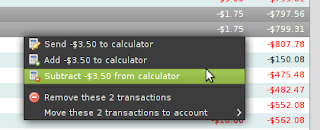
…and enhanced right-click actions for transactions which now work on multiple selected transactions:
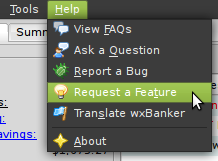
See the included changelog for a full list of new things. Launchpad is also fairly well integrated into wxBanker, so to file a bug or do almost anything else, just use the help menu. The Spanish and French translations are complete but I could really use help everywhere else: https://translations.launchpad.net/wxbanker !
Check out https://wiki.ubuntu.com/wxBanker for more screenshots, or the wxBanker homepage at https://launchpad.net/wxbanker for more information including the users team/mailing list, and the translations team. If you are interested in the less exciting stable version, 0.4.1.0 can be found in the Ubuntu repos as of Jaunty, available in about 18 languages.
Enjoy, and let me know of any issues or comments you have, and thanks in advance for translations :)

wxBanker 0.5 has been a long time in the making, as it represents a large refactor of the underlying code to make everything much faster, more stable, and easier to extend and implement new functionality. This is especially noticeable in the start up time.
There is also a new transaction grid which allows for sorting, a CSV import option in Tools (so you can import transactions from your banks initially)

…and enhanced right-click actions for transactions which now work on multiple selected transactions:

See the included changelog for a full list of new things. Launchpad is also fairly well integrated into wxBanker, so to file a bug or do almost anything else, just use the help menu. The Spanish and French translations are complete but I could really use help everywhere else: https://translations.launchpad.net/wxbanker !

Check out https://wiki.ubuntu.com/wxBanker for more screenshots, or the wxBanker homepage at https://launchpad.net/wxbanker for more information including the users team/mailing list, and the translations team. If you are interested in the less exciting stable version, 0.4.1.0 can be found in the Ubuntu repos as of Jaunty, available in about 18 languages.
Enjoy, and let me know of any issues or comments you have, and thanks in advance for translations :)
Comments
Using the “Finally” Block in Python to Write Robust Applications
This is the first post in my series of three on using XMLRPC to run tests remotely in python (such as javascript and selenium tests in web browsers) and get the results. If that doesn’t concern you, this post is probably still relevant; I’d just like to cover the groundwork of making code that is stable and repeatable even in the face of [un]expected problems. Luckily for us, python has a wonderful “finally” block which can be used to properly clean up or “finish” regardless of Bad Things. Let’s look at an example of a common problem this can solve:
We need exclusive access to a resource, so we get a lock. We do some stuff, and then release the lock. The problem is that if doStuff raises an exception, the lock never gets released, and your application can be in a broken state. You want to release the lock no matter what. So what you should do is:
Now save a SIGKILL, the lock is going to be released. This is pretty basic, but it is impressive how robust the finally block is. You can “return” in the try block or even “sys.exit()” and the code in the finally block will still be executed.
I recently used this with XMLRPC to safely tell the remote machine to clean up if the local script ran into problems or even got a SIGTERM from a keyboard interrupt. Here’s a more elaborate example:
The remote machine (“proxy”) is running some tests in firefox. While it does this it sets a lock so no one else can run the same tests. If something goes wrong, this lock needs to be reset and firefox needs to be closed so they can run again later. If it gets a result, return it. If it doesn’t or something goes wrong, we still clean up but now we can exit with an error code. One of the neatest things about this for me was Ctrl+C’ing the script on my computer and watching the remote machine cleanly quit firefox and release the lock for another process to use.
This is great whenever you need to put something in a temporary state, or change the state after an operation no matter what happens. Think of locks, temporary files, memory usage, or open connections where it is important to close them. Conversely however, make sure you DON’T use an approach like when it isn’t appropriate.
This is potentially incorrect behavior, because if you failed to ping your client you may want to keep it on the list to try again next time. However, you also may only want to attempt this once and then the above approach would be correct!
In my next post I am going to turn more specifically to remote browser testing and explain how exactly to set up both ends of the connection. After that I’ll finish by making a post on using twisted + SSL to retrieve posted results over HTTPS.
getLock()
doStuff()
releaseLock()
We need exclusive access to a resource, so we get a lock. We do some stuff, and then release the lock. The problem is that if doStuff raises an exception, the lock never gets released, and your application can be in a broken state. You want to release the lock no matter what. So what you should do is:
getLock()
try:
doStuff()
finally:
releaseLock()
Now save a SIGKILL, the lock is going to be released. This is pretty basic, but it is impressive how robust the finally block is. You can “return” in the try block or even “sys.exit()” and the code in the finally block will still be executed.
I recently used this with XMLRPC to safely tell the remote machine to clean up if the local script ran into problems or even got a SIGTERM from a keyboard interrupt. Here’s a more elaborate example:
proxy = xmlrpclib.ServerProxy(remoteIP)
try:
result = proxy.RunTests()
if result is None:
sys.exit(1)
else:
return result
except:
sys.exit(2)
finally:
proxy.CloseFirefox()
The remote machine (“proxy”) is running some tests in firefox. While it does this it sets a lock so no one else can run the same tests. If something goes wrong, this lock needs to be reset and firefox needs to be closed so they can run again later. If it gets a result, return it. If it doesn’t or something goes wrong, we still clean up but now we can exit with an error code. One of the neatest things about this for me was Ctrl+C’ing the script on my computer and watching the remote machine cleanly quit firefox and release the lock for another process to use.
This is great whenever you need to put something in a temporary state, or change the state after an operation no matter what happens. Think of locks, temporary files, memory usage, or open connections where it is important to close them. Conversely however, make sure you DON’T use an approach like when it isn’t appropriate.
for client in clientsToPing[:]:
try:
ping(client)
finally:
clientsToPing.remove(client)
This is potentially incorrect behavior, because if you failed to ping your client you may want to keep it on the list to try again next time. However, you also may only want to attempt this once and then the above approach would be correct!
In my next post I am going to turn more specifically to remote browser testing and explain how exactly to set up both ends of the connection. After that I’ll finish by making a post on using twisted + SSL to retrieve posted results over HTTPS.
Comments
Unfortunately, there are quite a few exceptions that can happen *between* bytecodes. The most commonly encountered is KeyboardInterrupt but there are others. That means this code:
f = open(‘blah.txt’, ‘w’)
try:
…
finally:
f.close()
doesn’t always close the file. You could have an exception between open and the start of your try…finally block! Yay python.
f = open(‘blah.txt’, ‘w’)
try:
…
finally:
f.close()
doesn’t always close the file. You could have an exception between open and the start of your try…finally block! Yay python.
Look at python 2.5’s context managers and the with statement. These are a more elegant way of solving this very problem without littering your code with finally: statements.
Ensuring That You Test What Your Users Use
Recently I’ve come across two pitfalls when testing one of my python applications. In two different cases the tests will run fine in my checkout, but fail miserably for anyone else (because the application is broken). What was happening?
1) I had a new file which is required to run, but I forget to ‘vcs add’ it. Because the file existed in my sandbox, everything was well. But no one else was getting this file, so they couldn’t even run the application. This one is somewhat easy to detect because a ‘vcs st’ should show that file as unknown status. In that way ensuring a clean status before running the tests can help avoid this. However this won’t work well in an automated fashion because there are often unversioned files, and you typically want to run the tests before committing anyway.
2) A time or two I thought I had completely removed/renamed a dependency but forgot to clean up an import somewhere along the line. Even though the original .py file was gone, a .pyc file by the old name still existed, which allowed the lingering import to work. Again however, for anyone else getting a fresh checkout or release, this file would not be avaible and the app would be unusable.
How can you avoid having problems like this? Well, from a myopic viewpoint you could have your test suite delete any .pyc files before running. Then to address the first issue, you could also test that a ‘vcs st’ has no unknown files, and explicitly ignore any unversioned files you expect. But still, other things could creep up. And while having another machine as your “buildbot” would avoid the first issue, you are still prone to an attack from the second. To really make sure you are testing with the same stuff that you release, you need to be testing releases. In other words, you need to be putting your version through your shipping process, whatever that is, and then testing the final product.
So now that I’ve realized this is what I should be doing, I’m not quite sure what the simplest and easiest way to do it in an automated fashion is. For python, perhaps this could be achieved by getting a fresh export/checkout of the code in a temporary directory, adding that directory to sys.path, and importing and running the tests. I am sure this is a common problem; is there a common solution?
1) I had a new file which is required to run, but I forget to ‘vcs add’ it. Because the file existed in my sandbox, everything was well. But no one else was getting this file, so they couldn’t even run the application. This one is somewhat easy to detect because a ‘vcs st’ should show that file as unknown status. In that way ensuring a clean status before running the tests can help avoid this. However this won’t work well in an automated fashion because there are often unversioned files, and you typically want to run the tests before committing anyway.
2) A time or two I thought I had completely removed/renamed a dependency but forgot to clean up an import somewhere along the line. Even though the original .py file was gone, a .pyc file by the old name still existed, which allowed the lingering import to work. Again however, for anyone else getting a fresh checkout or release, this file would not be avaible and the app would be unusable.
How can you avoid having problems like this? Well, from a myopic viewpoint you could have your test suite delete any .pyc files before running. Then to address the first issue, you could also test that a ‘vcs st’ has no unknown files, and explicitly ignore any unversioned files you expect. But still, other things could creep up. And while having another machine as your “buildbot” would avoid the first issue, you are still prone to an attack from the second. To really make sure you are testing with the same stuff that you release, you need to be testing releases. In other words, you need to be putting your version through your shipping process, whatever that is, and then testing the final product.
So now that I’ve realized this is what I should be doing, I’m not quite sure what the simplest and easiest way to do it in an automated fashion is. For python, perhaps this could be achieved by getting a fresh export/checkout of the code in a temporary directory, adding that directory to sys.path, and importing and running the tests. I am sure this is a common problem; is there a common solution?
Comments
I had this problem the other day releasing some code at work.
The way I do a release is to run my release script, which reads in file lists scattered around the program, copies them to a new place, compiles them and runs all the tests. It then runs a make clean(*) and builds a tar ball. The file lists are used for generating the makefiles, so all the dependencies are explicitly listed.
To release, I untar it into another teams subversion repository, add it and commit.
It sounded pretty foolproof to me. So, I untarred it, ran “svn add”, then tried compiling it, testing it etc and everything worked. I checked “svn stat” to make sure I wasn’t going to commit anything by accident, and it all looked fine.
The next day, I had an email telling me that I broke the build :-).
It turned out that when I was creating the file list used for building the release, I accidentally included a backup file (“somefile.c~”) in the list. The tarball included the file (since the release script copies all the files listed), so when I untarred it into the svn repository, the file was put in there. But if you do an svn add, it will skip over such files. So when I committed, the backup file was missing, which then made the makefile barf, because all the files from the file list are dependencies.
I can’t quite think of a good way to prevent this from happening again.
(*) This is one step where things could go wrong - if the clean target doesn’t delete everything, then the release will include files that should be generated.
The way I do a release is to run my release script, which reads in file lists scattered around the program, copies them to a new place, compiles them and runs all the tests. It then runs a make clean(*) and builds a tar ball. The file lists are used for generating the makefiles, so all the dependencies are explicitly listed.
To release, I untar it into another teams subversion repository, add it and commit.
It sounded pretty foolproof to me. So, I untarred it, ran “svn add”, then tried compiling it, testing it etc and everything worked. I checked “svn stat” to make sure I wasn’t going to commit anything by accident, and it all looked fine.
The next day, I had an email telling me that I broke the build :-).
It turned out that when I was creating the file list used for building the release, I accidentally included a backup file (“somefile.c~”) in the list. The tarball included the file (since the release script copies all the files listed), so when I untarred it into the svn repository, the file was put in there. But if you do an svn add, it will skip over such files. So when I committed, the backup file was missing, which then made the makefile barf, because all the files from the file list are dependencies.
I can’t quite think of a good way to prevent this from happening again.
(*) This is one step where things could go wrong - if the clean target doesn’t delete everything, then the release will include files that should be generated.
by rapid iteration I mean continuous integration
We have the first problem on our website as well; forgetting to check in a .php file.
We don’t have an automated solution, but rapid iteration helps make it a non-issue. Basically, we haven’t trained ourselves to ignore unversioned files, because we’re used to never having any.
We don’t have an automated solution, but rapid iteration helps make it a non-issue. Basically, we haven’t trained ourselves to ignore unversioned files, because we’re used to never having any.
We delete .pycs and .pyos as a BuildBot step.
I have had great success setting up an acceptance test suite that actually constructs an installer, installs the software, and starts the application.
We then test the application by prodding it from outside its process. (eg with Windows messages)
We then test the application by prodding it from outside its process. (eg with Windows messages)
Hey Mike,
I’ve one suggestion that may be appropriate: build a package.
If you use “bzr-builddeb” then this could be as simple as running “bzr bd” every so often, installing the resulting deb, and testing the system version.
That would check various things, and would catch exactly the case you describe with not running “bzr add”
on the filename.
Thanks,
James
I’ve one suggestion that may be appropriate: build a package.
If you use “bzr-builddeb” then this could be as simple as running “bzr bd” every so often, installing the resulting deb, and testing the system version.
That would check various things, and would catch exactly the case you describe with not running “bzr add”
on the filename.
Thanks,
James
patch queue manager should do all you require I think.
I think that in the books “Expert python programming” and “Foundations of Agile python development” cover this topic in depth.
Delicious, Cheap, and Easy Whole Wheat Wraps!
Some of my bloodpact blogging friends have written recipes, and I thought I would add one of my favorite and simplest recipes to the mix. Wraps are a great food delivering device, be it for eggs or veggies, meat or rice and beans. It also happens to be easy to make your healthy wraps without any special tools, for roughly 10 cents a piece! Best of all, you can use as few as two ingredients if you so desire.
Here’s what you’ll need.
Now roll them out. For this I recommend rolling between two non-stick surfaces, such as flexible cutting mats (a dollar store or grocery store should have 3 packs for $3-5), silicone baking sheets (also can be had for a few bucks), or something similar. So put a dough ball on a non-stick surface, then optionally put another on top. Now roll it out with a rolling pin if you have one, or a bottle of wine/oil/beer if you don’t. It is easiest if you flatten it out by hand as much as you can first! It may take a couple tries to get them as flat (and as such wide) as you like, but you will definitely improve. Or you could just get a tortilla press online, though I have yet to give in.
Now heat a pan on the stove to medium-high heat. Once it seems up to heat, throw a wrap on the pan (no greasing necessary). After 15-30 seconds you should be able to jiggle the pan and have the wrap freely slide around, and this is useful for ensuring it doesn’t burn. Give it about 1-2 minutes on that side, until you start to see a bubble or two, then flip it over for another 1-2 minutes. Now sit it on a towel to cool, and repeat for the rest of your future wraps! As they are delicious warm, I like use one right after I make them.
I love making these wraps because it is much cheaper than buying them, can be as healthy as I want, and makes eating them much more enjoyable knowing that I hand-crafted each one. Common uses are eggs with veggies in the morning or your typical taco fare. You can also make mini flatbread pizzas, or sandwich some cheese and veggies in between two for an extra tasty treat! Let me know what you think!

Here’s what you’ll need.
- 1C whole wheat flour (or white)
- 1/4C cold water
- 1/4 teaspoon salt (recommended)
- 1 tablespoon olive oil (optional)
- 1/4 teaspoon baking powder (optional)
- seasonings such as oregano, onion powder, or herbs (optional)
Now roll them out. For this I recommend rolling between two non-stick surfaces, such as flexible cutting mats (a dollar store or grocery store should have 3 packs for $3-5), silicone baking sheets (also can be had for a few bucks), or something similar. So put a dough ball on a non-stick surface, then optionally put another on top. Now roll it out with a rolling pin if you have one, or a bottle of wine/oil/beer if you don’t. It is easiest if you flatten it out by hand as much as you can first! It may take a couple tries to get them as flat (and as such wide) as you like, but you will definitely improve. Or you could just get a tortilla press online, though I have yet to give in.
Now heat a pan on the stove to medium-high heat. Once it seems up to heat, throw a wrap on the pan (no greasing necessary). After 15-30 seconds you should be able to jiggle the pan and have the wrap freely slide around, and this is useful for ensuring it doesn’t burn. Give it about 1-2 minutes on that side, until you start to see a bubble or two, then flip it over for another 1-2 minutes. Now sit it on a towel to cool, and repeat for the rest of your future wraps! As they are delicious warm, I like use one right after I make them.
I love making these wraps because it is much cheaper than buying them, can be as healthy as I want, and makes eating them much more enjoyable knowing that I hand-crafted each one. Common uses are eggs with veggies in the morning or your typical taco fare. You can also make mini flatbread pizzas, or sandwich some cheese and veggies in between two for an extra tasty treat! Let me know what you think!
Comments
this is absolutely great! (hopefully that is!)
Yes, it is similar to Chapathi although not with durum flour.
http://en.wikipedia.org/wiki/Chapathi
Finding New Albums by Your Favorite Bands
The other week I felt a little disconnected from recent music. I was sure that some of my favorite artists had released new albums that I wasn’t aware of, but I wasn’t sure how to be notified of it. I use last.fm when listening to music most of the time, and have been for about 5 years, so I already have a long and dynamic list of my favorite artists, many of which I haven’t been keeping up to date with. There are also many places that offer feeds of recent albums, including a private torrent site, Waffles. As a curious programmer I decided to bridge the gap here and write a little proof of concept script that would grab my top last.fm artists and query Waffles to see what was new.
About an hour and 100 lines of python later, I had a working proof-of-concept. Right now it only supports Last.fm as a favorites source, and Waffles as a release source, but expanding it by following the same interface should be fairly straightforward. It is up for anyone to branch at https://launchpad.net/nutunes. For any programmer it should be pretty easy to make a favorite source which reads from a text file and use other services like allmusic.com, amazon, or perhaps even iTunes to get a list of recent releases for a given artist. Feel free to branch and create a merge proposal for integrating with other services. As the code is less than 100 lines, I hope it more or less documents itself. To use it just run nutunes.py and it will prompt for your last.fm username, and Waffles credentials.
What other ways are people currently staying on top of music of all the bands you are interested in? Heck, maybe Last.fm already has this option, but I sure didn’t notice it, and learning and experimenting is fun!
About an hour and 100 lines of python later, I had a working proof-of-concept. Right now it only supports Last.fm as a favorites source, and Waffles as a release source, but expanding it by following the same interface should be fairly straightforward. It is up for anyone to branch at https://launchpad.net/nutunes. For any programmer it should be pretty easy to make a favorite source which reads from a text file and use other services like allmusic.com, amazon, or perhaps even iTunes to get a list of recent releases for a given artist. Feel free to branch and create a merge proposal for integrating with other services. As the code is less than 100 lines, I hope it more or less documents itself. To use it just run nutunes.py and it will prompt for your last.fm username, and Waffles credentials.
What other ways are people currently staying on top of music of all the bands you are interested in? Heck, maybe Last.fm already has this option, but I sure didn’t notice it, and learning and experimenting is fun!
Comments
Cool idea! What I do to stay current, is have an mp3spider[1] crawl a few hundred mp3blogs. This results in a huge bag of mp3 of varying levels of interest to me. The way I wade through them is with a plugin I’ve made[2] that plays similar[3] songs together (i.e. if I hit a patch of stuff I don’t like, I can hit delete until something better comes along.)
[1] http://code.google.com/p/barbipes/
[2] http://code.google.com/p/autoqueue/ designed to be cross player, currently works with mpd, rhythmbox, and my favorite, quod libet
[3] similarity is looked up by track and artist on last.fm, and by acoustic properties. It’s easy to add new sources of similarity.
[1] http://code.google.com/p/barbipes/
[2] http://code.google.com/p/autoqueue/ designed to be cross player, currently works with mpd, rhythmbox, and my favorite, quod libet
[3] similarity is looked up by track and artist on last.fm, and by acoustic properties. It’s easy to add new sources of similarity.
Nice Idea!
For Information: There is already a service, which look to MusicBrainz for new albums and singles: www.muspy.com
For Information: There is already a service, which look to MusicBrainz for new albums and singles: www.muspy.com
Eye Tracking and UI Framework / Window Manager Integration
 Eye tracking is the technique of watching the user’s eyes with a camera and figuring out where on the screen he or she is looking. While some computer users with disabilities use this technology as their primary input device, it hasn’t become very popular. However I think that with webcams being integrated into the majority of new laptops, and multi-core processors with some cycles to spare for image processing becoming ubiquitous, eye tracking deserves to become more popular.
I don’t believe the technology is accurate enough (yet) to replace your mouse, but it could still improve usability in a few ways. Imagine having the equivalent of onMouseIn and onMouseOut events on widgets when writing a user interface, but for where the user is looking instead. Applications could leverage onLookIn and onLookOut events at the widget level and open a whole new realm of functionality and usability. Videos and games could pause themselves when you look away, or bring up certain on-screen displays when you look at certain corners of the screen. If an application sees you are studying a certain element for a period of time, it may ask if you need help.
It would also be interesting to see eye tracking leveraged on the window manager level. Most people use focus follows click to focus windows, and some enjoy focus follows mouse, but imagine focus follows (eye) focus! Using multiple monitors would become much easier if your keyboard input was automatically directed to the application, or even specific field, which you were looking at. Eye gestures, like mouse gestures, could be potentially useful as well, such as glancing off-screen to move to the virtual desktop in that direction.
Apple and Linux both seem to be in a good position to implement something like this. Apple has control of both the hardware and the software including the OS, and has been integrating cameras in laptops for a while. As a result they are in a great position to pioneer this field and really have something unique to bring to the table in terms of a completely new user experience. However in the open-source world, Linux is also in a decent spot to do this as the UI frameworks and window managers are all patchable and most webcams are supported out of the box.
Eye tracking has the potential to enable us to use computers in ways that were previously impossible. What are your thoughts on eye tracking? Does it have a future in the computing world and where can it take us? And how long will it be before we will take this technology for granted? :)
Comments
Yeah, I had the exact same experience. At work I have a dual monitor setup, and running a virtual machine in one of them all the time. Because of this, sometimes you will have windows looking focused on both screens.
Focus follows eyes would be nice there, even if it was just window focus (as opposed to the specific control inside a window)
Focus follows eyes would be nice there, even if it was just window focus (as opposed to the specific control inside a window)
I remember trying to figure out a good way to do this back in 2002 when I was dealing with my first dualmon setup and I kept having that whole “I look at a different monitor and I start typing into the window I’m looking at but it doesn’t have focus” problem.
At the time all I could think about was doing it via IR emitters on the arms of my glasses and a receptor grid to figure out which monitor was being looked at.
…But then I learned all of the defensive responses to using multimon and the desire disappeared. I really haven’t thought of this in a while, but I remember getting excited by the prospect of a mouse-free GUI world :(
At the time all I could think about was doing it via IR emitters on the arms of my glasses and a receptor grid to figure out which monitor was being looked at.
…But then I learned all of the defensive responses to using multimon and the desire disappeared. I really haven’t thought of this in a while, but I remember getting excited by the prospect of a mouse-free GUI world :(
On first glance the focus-follows-eyes sounds intriguing, but I’m afraid I might not always look at what I am typing. I might look at a physical sheet off the computer screen, or I might watch/read one window and type my thoughts in the other.
I am not 100% sure that I really do all of this, but it would be worth investigating before spending time on any implementation.
I think you need at least something like this: http://www.techsmith.com/morae.asp
I use Camtasia at the office (same company) and don’t know if Morae already does all you need, but you will need smething that can track eye focus on a widget level and correlate it to screen actions, otherwise you will go mad trying to align eyes in the face cam to the screen capture.
I am not 100% sure that I really do all of this, but it would be worth investigating before spending time on any implementation.
I think you need at least something like this: http://www.techsmith.com/morae.asp
I use Camtasia at the office (same company) and don’t know if Morae already does all you need, but you will need smething that can track eye focus on a widget level and correlate it to screen actions, otherwise you will go mad trying to align eyes in the face cam to the screen capture.
I think this would be good for anonymous webcam. Follow eyes, cheekbones, nose, chin, and replace with scalable graphics. Send along with poser-type information for skin tone, headwear, hair color.
It would be fast, give an appearance of web camming, and give the cammer good options on how they present themselves.
It would be fast, give an appearance of web camming, and give the cammer good options on how they present themselves.
Webhooks and Feeds as Complementary Technologies -or- How Webhooks Can Enable a Collective Intelligence
Yesterday I wrote about my observation that feeds seemed sort of like the precursor to webhooks, but that each had distinct advantages. Adam left a comment confirming my thoughts on their pros and cons, but then pointed out how they can be used together to get the best of both worlds. I really liked the implications and wanted to expand upon how webhooks could enable the next generation of feed readers, and further, really lead us towards a more collective intelligence.
The way things work now is that you have an aggregator, such as Google Reader, which polls all of your feeds every once and a while (although in this specific case surely doing some caching behind the scenes for users with the same feeds). This is suboptimal for two reasons. First, you don’t get instant updates. Statistically, you will on average receive an update pollFrequency/2 minutes after it is posted. If you want to be able to respond to something in a quicker fashion, this may not cut it. Second is that the polling is causing unnecessary load on the server.
Now let’s try it with just webhooks. You inform all the event producers you are interested in about your aggregator callback, and you get instant updates for all of them, with no wasted polling. However when your aggregator is off, you aren’t receiving updates! This means you can miss updates, and you have no way to catch up.
Combining these two however, we can solve the problems of each technology with the other and pick up none of their downfalls. Use webhooks to tell your event producers about your aggregator as was done previously in the webhooks model. But now, the producer is also supplying a feed. This means that when your aggregator is up it will receive instant updates and doesn’t need to poll. However when you start it up after having been down, it can use the feed to catch back up; no missed events!
I think this new model has the potential to improve aggregators, as well as make them more usable for applications where speed is important. It could also have a much greater impact though. Twitter is a good example of this I think, wherein you could tweet about things you need fast feedback on such as a meal choice at a restaurant, the best way to do something you are working on, or perhaps even more urgent things such as needing a ride. All of these things could and surely are done in the traditional model, but with the push revolution they become more useful as quicker responses are more likely. People will become more likely to produce things requiring (potentially much) faster feedback, and this feeds into itself as people become more likely to respond, knowing that their responses are more relevant because less time has passed. I think it is an evolution that, while initially potentially sounding subtle and unimportant, can help lead is into a more collective intelligence that we couldn’t imagine living without once we have it.
The way things work now is that you have an aggregator, such as Google Reader, which polls all of your feeds every once and a while (although in this specific case surely doing some caching behind the scenes for users with the same feeds). This is suboptimal for two reasons. First, you don’t get instant updates. Statistically, you will on average receive an update pollFrequency/2 minutes after it is posted. If you want to be able to respond to something in a quicker fashion, this may not cut it. Second is that the polling is causing unnecessary load on the server.
Now let’s try it with just webhooks. You inform all the event producers you are interested in about your aggregator callback, and you get instant updates for all of them, with no wasted polling. However when your aggregator is off, you aren’t receiving updates! This means you can miss updates, and you have no way to catch up.
Combining these two however, we can solve the problems of each technology with the other and pick up none of their downfalls. Use webhooks to tell your event producers about your aggregator as was done previously in the webhooks model. But now, the producer is also supplying a feed. This means that when your aggregator is up it will receive instant updates and doesn’t need to poll. However when you start it up after having been down, it can use the feed to catch back up; no missed events!
I think this new model has the potential to improve aggregators, as well as make them more usable for applications where speed is important. It could also have a much greater impact though. Twitter is a good example of this I think, wherein you could tweet about things you need fast feedback on such as a meal choice at a restaurant, the best way to do something you are working on, or perhaps even more urgent things such as needing a ride. All of these things could and surely are done in the traditional model, but with the push revolution they become more useful as quicker responses are more likely. People will become more likely to produce things requiring (potentially much) faster feedback, and this feeds into itself as people become more likely to respond, knowing that their responses are more relevant because less time has passed. I think it is an evolution that, while initially potentially sounding subtle and unimportant, can help lead is into a more collective intelligence that we couldn’t imagine living without once we have it.
Are Feeds the Pre-cursor to Webhooks?
Recently I’ve been reading Timothy and Jeff talk about webhooks. Webhooks are essentially an amazingly simple way to be notified about arbitrary events on the web. In this model, any event producer allows you to supply a URL, which it will post to on each future action with the relevant details, whatever they may be. Then the other day when I was using Google Reader, something struck me: it felt a lot like webhooks, but turned on its head.
Anything that offers a feed such as RSS or Atom can be plugged into Google Reader; things like blogs and their comments, twitter searches, commits, downloads, bugs, and build results. As I started plugging more and more diverse things into Reader, I realized that it was basically like the “pull” equivalent of webhook’s “push” nature. Instead of telling all these event producers where to contact me, I’m telling Reader where to learn about all the recent events.
I may be thinking too shallowly, but in the webhooks world Reader would be the service offering the interface. Then, instead of all these different things offering feeds, you could just plug Reader’s hook into them and be notified instantly. Currently, for example, when I ask a question on a blog post, I’ll throw the comments feed for that post into Reader so I don’t have to keep checking back on the site; Reader will bring the potential answers to me. With webhooks though, I would reverse this and provide the service with the URL of my event consumer.
It seems like, as technology and the internet often does, feeds are evolving into what users need them to be. Services are seeing that people want to follow and be kept up to date without having to check back on hundreds of different sites. That’s way too much time and information, especially when it all looks different. However, by plugging the feeds of all those things into an aggregator, we gain a central notification place for all these events, and it becomes much more managable.
So will webhooks replace the current paradigm that I’m using here, or complement it? They seem to each have their pros and cons. Feeds allow a history, and you won’t miss an update because your aggregator was down; it will catch it on the next poll. However webhooks are instant and can be more efficient as you don’t have the need for polling at all, but if the producer loses your hook, you’re out of the loop.
So an overflow of interesting events occurring on the web necessitated a standard way to view them, and we got feeds. Are webhooks the next step of this evolution, or something else entirely?
UPDATE: Mark Lee responds.
Anything that offers a feed such as RSS or Atom can be plugged into Google Reader; things like blogs and their comments, twitter searches, commits, downloads, bugs, and build results. As I started plugging more and more diverse things into Reader, I realized that it was basically like the “pull” equivalent of webhook’s “push” nature. Instead of telling all these event producers where to contact me, I’m telling Reader where to learn about all the recent events.
I may be thinking too shallowly, but in the webhooks world Reader would be the service offering the interface. Then, instead of all these different things offering feeds, you could just plug Reader’s hook into them and be notified instantly. Currently, for example, when I ask a question on a blog post, I’ll throw the comments feed for that post into Reader so I don’t have to keep checking back on the site; Reader will bring the potential answers to me. With webhooks though, I would reverse this and provide the service with the URL of my event consumer.
It seems like, as technology and the internet often does, feeds are evolving into what users need them to be. Services are seeing that people want to follow and be kept up to date without having to check back on hundreds of different sites. That’s way too much time and information, especially when it all looks different. However, by plugging the feeds of all those things into an aggregator, we gain a central notification place for all these events, and it becomes much more managable.
So will webhooks replace the current paradigm that I’m using here, or complement it? They seem to each have their pros and cons. Feeds allow a history, and you won’t miss an update because your aggregator was down; it will catch it on the next poll. However webhooks are instant and can be more efficient as you don’t have the need for polling at all, but if the producer loses your hook, you’re out of the loop.
So an overflow of interesting events occurring on the web necessitated a standard way to view them, and we got feeds. Are webhooks the next step of this evolution, or something else entirely?
UPDATE: Mark Lee responds.
Comments
Hi Michael
I’ve launched a very simple web service that is similar to some of the tools mentioned in the comments above. It polls pull-only services, and pushes updates via XML POST to a web endpoint of your choice.
At the moment it has adapters for general RSS and for Twitter.
http://myqron.com
I’ve launched a very simple web service that is similar to some of the tools mentioned in the comments above. It polls pull-only services, and pushes updates via XML POST to a web endpoint of your choice.
At the moment it has adapters for general RSS and for Twitter.
http://myqron.com
guptaxpn: I’d recommend reading my next post http://mrooney.blogspot.com/2009/02/webhooks-and-feeds-as-complementary.html which actually details the advantages to the end user. Push vs pull seems like a subtle difference at first glance, but if you really think about the new uses it allows for, it is quite powerful and opens up a new world to “joe-computer-user”.
So, it’s push, instead of pull?
Again, how does this help average-joe-computer-user?
How do feeds even help average-joe-computer-user?
How can I help push feed/webhooks(syndication) adoption?
Again, how does this help average-joe-computer-user?
How do feeds even help average-joe-computer-user?
How can I help push feed/webhooks(syndication) adoption?
How is this different from ping, which is supported by most opensource blogging platforms (eg, wordpress)? Google blog search and technorati already support ping consumption, btw.
And if you’re talking about an RSS reader being able to add themselves as ping receivers, how will you handle NAT’d IP addresses? More importantly, how will you handle a DoS where an attacker gives a vast number of webhook consumer URLs to a blog?
And if you’re talking about an RSS reader being able to add themselves as ping receivers, how will you handle NAT’d IP addresses? More importantly, how will you handle a DoS where an attacker gives a vast number of webhook consumer URLs to a blog?
Michael,
While frustrations with feeds certainly get you thinking down the webhooks line of thought (and they did come before) I wouldn’t go as far to say one is a precursor of the other. Imagine that we had invented webhooks first – when we started wanting to get reliable delivery of sequential data we might have gone and invented feeds After as a reaction to problems with the endpoint for the hook not always being alive.
Feeds and webhooks can benefit a lot from each other if you hook them up right. Hooks get instantaneous updates and feeds get you an ordered, persistent backlog of events. If you goal is to consume ALL events in a stream, feeds have all of the Content you want already (you just have to do a lot of work to get it in a timely manner). Moving to hook-only delivery of events leads you to making difficult or arbitrary decisions on matters like “what does it mean when I don’t get 200 OK? what does it mean if I can’t even establish a connection?”. If you keep feeds around (and let people request paged feeds that show all events since a given time) you can use hooks to deliver only the feed url and a new last updated time. This way, even if your client (the hook consumer) is flaky, it can still eat 100.0% of the events in their full detail (which is what you want for a Reader-like app) with minimal polling. Let hooks be the light-weight hint and don’t reinvent things like the Atom Publishing Protocol over hook and get stuck with the requirement of an always-available client.
While frustrations with feeds certainly get you thinking down the webhooks line of thought (and they did come before) I wouldn’t go as far to say one is a precursor of the other. Imagine that we had invented webhooks first – when we started wanting to get reliable delivery of sequential data we might have gone and invented feeds After as a reaction to problems with the endpoint for the hook not always being alive.
Feeds and webhooks can benefit a lot from each other if you hook them up right. Hooks get instantaneous updates and feeds get you an ordered, persistent backlog of events. If you goal is to consume ALL events in a stream, feeds have all of the Content you want already (you just have to do a lot of work to get it in a timely manner). Moving to hook-only delivery of events leads you to making difficult or arbitrary decisions on matters like “what does it mean when I don’t get 200 OK? what does it mean if I can’t even establish a connection?”. If you keep feeds around (and let people request paged feeds that show all events since a given time) you can use hooks to deliver only the feed url and a new last updated time. This way, even if your client (the hook consumer) is flaky, it can still eat 100.0% of the events in their full detail (which is what you want for a Reader-like app) with minimal polling. Let hooks be the light-weight hint and don’t reinvent things like the Atom Publishing Protocol over hook and get stuck with the requirement of an always-available client.
guptaxpn: the advantage of hooks is that you don’t need a middle-man service, which you always do with polling.
For example, let’s say you want to build your product on an svn commit. All you do is throw a “wget http://buildserver/?build=now” in your post-commit hook. That’s it! If your svn server on the other hand publishes a feed (that’s more work already) you have to have something to constantly poll that and then trigger the build. Not to mention it will be either delayed or very expensive to poll constantly.
Basically, it means you don’t have to implement feed-polling/parsing in your event consumer. If it can already have actions triggered via http, you don’t have to change it all (especially useful if you don’t have direct access to it) and you get it for free.
For example, let’s say you want to build your product on an svn commit. All you do is throw a “wget http://buildserver/?build=now” in your post-commit hook. That’s it! If your svn server on the other hand publishes a feed (that’s more work already) you have to have something to constantly poll that and then trigger the build. Not to mention it will be either delayed or very expensive to poll constantly.
Basically, it means you don’t have to implement feed-polling/parsing in your event consumer. If it can already have actions triggered via http, you don’t have to change it all (especially useful if you don’t have direct access to it) and you get it for free.
What exactly is the “upgrade” or “upside” of webhooks vs. feeds?
honestly, I understand that imap and push are better than pop and pull
but webhooks/feeds just seem too similar to the end-user for me to really understand why I would want to prefer one over the other
honestly, I understand that imap and push are better than pop and pull
but webhooks/feeds just seem too similar to the end-user for me to really understand why I would want to prefer one over the other
You might be interested in Specto.
http://specto.sourceforge.net/
“Specto is a desktop application that will watch configurable events (such as website updates, emails, file and folder changes, system processes, etc) and then trigger notifications.
For example, Specto can watch a website for updates (or a syndication feed, or an image, etc), and notify you when there is activity (otherwise, Specto will just stay out of the way). This changes the way you work, because you can be informed of events instead of having to look out for them. ”
http://specto.sourceforge.net/
“Specto is a desktop application that will watch configurable events (such as website updates, emails, file and folder changes, system processes, etc) and then trigger notifications.
For example, Specto can watch a website for updates (or a syndication feed, or an image, etc), and notify you when there is activity (otherwise, Specto will just stay out of the way). This changes the way you work, because you can be informed of events instead of having to look out for them. ”
Michael,
The “webhooks” concept that you mention sounds a lot like the work that people are doing with PubSub and XMPP. Roy Fielding has an interesting article about when it might be architecturally appropriate to use this approach, titled ”Paper tigers and hidden dragons”. You may find it interesting.
The “webhooks” concept that you mention sounds a lot like the work that people are doing with PubSub and XMPP. Roy Fielding has an interesting article about when it might be architecturally appropriate to use this approach, titled ”Paper tigers and hidden dragons”. You may find it interesting.
Cracking On-Screen Keyboards With Visual Keyloggers
A few financial sites including HSBC and the US Treasury have recently added an extra measure of security to their site. Instead of simply requiring a username and password, an on-screen keyboard was added, requiring you to “type” in a second password with your mouse:
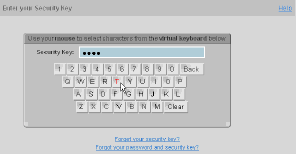
The logic behind this is that if a user’s computer becomes compromised with a keylogger, the attacker could only obtain the username and primary password. The secondary password would remain uncomprised as it doesn’t involve keypresses. This didn’t seem too useful to me however, so for my “Image Understanding” class I decided to see if it was possible to create a “visual keylogger” which could capture this secondary password. It wasn’t too difficult, and essentially demonstrated that the extra password was more inconvenience than security. Let me outline the basic process.
In order to do this, you need to be able to capture the contents of the screen at certain intervals. It seems like a fair assumption that if you (as the attacker of a comprimised system) can capture keyboard input, you can also grab screenshots. The goal is to turn a sequence of these screenshots of someone typing with an on-screen keyboard into a single string output equivalent to the password typed.
First we want to record the position of the mouse at each shot. This would normally be a trivial function by asking the OS; however, in my case I was writing this for an Image Understanding class and had to use the sequence of images as my sole input. As such, I used a basic templating approach to locate the mouse by a few of its key features. This was surprisingly robust; however, asking the OS for the mouse position is an easier, even more robust, and more likely attack vector in real life.
Now we need to figure out when the user clicked a key. Any keyboard used for a password purpose is going to give some form of feedback when a key is clicked, such as an asterisk in a password field, so the user knows if they have successfully clicked a key. The easiest way then to notice this is to subtract the color values of each screenshot from the previous one, giving you a new image with non-zero pixel values for each changed pixel. Among other things like cursor movement and web animations, the aforementioned asterisk feedback is going to be present in this image.

For each new image then, subtract and look for this feedback. If it’s there, that’s a key press! Combine this with the position of the mouse and you know where the user clicked. Now it gets slightly tricky. You know where they clicked, but if you grab that section of the screen, you’ll get something like this:

because the mouse had to be over the key to click it. This is rather easily worked around, however, by going backwards in your mouse position cache until it is a certain threshold away from the clicked position, and grabbing the key image at that point.
After the user enters the complete password, you are going to be left with an array of keyboard images. For any human, this is quite sufficient. For my class however, it was not, and it would not be for any large-scale operation where automation is desired. What we need to do is clean it up by throwing away any pixels under a certain darkness threshold, then cropping the result:
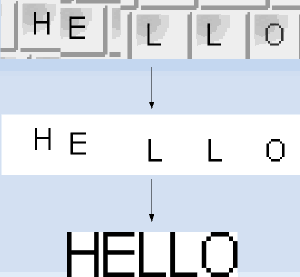
Ta-da! Now we have something that any OCR (optical character recognition) algorithm should be able to chomp through in its sleep cycles. If you are writing for a specific keyboard, you can also just have an array of what each key looks like in binary form and compare to get the answer.
And there you have it! With the combination of a few basic computer vision techniques, we can expand a keylogger to understand input from visual keyboards and render this security annoyance useless. A fun note is that the order/position of the keys is irrelevant. The US treasury website uses an on-screen keyboard as well, but shuffles the keys each attempt. As is hopefully obvious from this algorithm, there is no assumption of a keyboard layout; the keys could shuffle every single click and it wouldn’t matter.

The logic behind this is that if a user’s computer becomes compromised with a keylogger, the attacker could only obtain the username and primary password. The secondary password would remain uncomprised as it doesn’t involve keypresses. This didn’t seem too useful to me however, so for my “Image Understanding” class I decided to see if it was possible to create a “visual keylogger” which could capture this secondary password. It wasn’t too difficult, and essentially demonstrated that the extra password was more inconvenience than security. Let me outline the basic process.
In order to do this, you need to be able to capture the contents of the screen at certain intervals. It seems like a fair assumption that if you (as the attacker of a comprimised system) can capture keyboard input, you can also grab screenshots. The goal is to turn a sequence of these screenshots of someone typing with an on-screen keyboard into a single string output equivalent to the password typed.
First we want to record the position of the mouse at each shot. This would normally be a trivial function by asking the OS; however, in my case I was writing this for an Image Understanding class and had to use the sequence of images as my sole input. As such, I used a basic templating approach to locate the mouse by a few of its key features. This was surprisingly robust; however, asking the OS for the mouse position is an easier, even more robust, and more likely attack vector in real life.
Now we need to figure out when the user clicked a key. Any keyboard used for a password purpose is going to give some form of feedback when a key is clicked, such as an asterisk in a password field, so the user knows if they have successfully clicked a key. The easiest way then to notice this is to subtract the color values of each screenshot from the previous one, giving you a new image with non-zero pixel values for each changed pixel. Among other things like cursor movement and web animations, the aforementioned asterisk feedback is going to be present in this image.

For each new image then, subtract and look for this feedback. If it’s there, that’s a key press! Combine this with the position of the mouse and you know where the user clicked. Now it gets slightly tricky. You know where they clicked, but if you grab that section of the screen, you’ll get something like this:

because the mouse had to be over the key to click it. This is rather easily worked around, however, by going backwards in your mouse position cache until it is a certain threshold away from the clicked position, and grabbing the key image at that point.
After the user enters the complete password, you are going to be left with an array of keyboard images. For any human, this is quite sufficient. For my class however, it was not, and it would not be for any large-scale operation where automation is desired. What we need to do is clean it up by throwing away any pixels under a certain darkness threshold, then cropping the result:

Ta-da! Now we have something that any OCR (optical character recognition) algorithm should be able to chomp through in its sleep cycles. If you are writing for a specific keyboard, you can also just have an array of what each key looks like in binary form and compare to get the answer.
And there you have it! With the combination of a few basic computer vision techniques, we can expand a keylogger to understand input from visual keyboards and render this security annoyance useless. A fun note is that the order/position of the keys is irrelevant. The US treasury website uses an on-screen keyboard as well, but shuffles the keys each attempt. As is hopefully obvious from this algorithm, there is no assumption of a keyboard layout; the keys could shuffle every single click and it wouldn’t matter.
Comments
Anonymous: I am not quite sure how that relates to on-screen keyboards, could you clarify? I have never used an on-screen keyboard to log in to a linux box.
And if the visual “text box” doesn’t actually change at all?
(Ex., when logging into Linux, the password: cursor never moves, so you can’t deduce A) when keys are pressed by vision and B) how long the password is).
(Ex., when logging into Linux, the password: cursor never moves, so you can’t deduce A) when keys are pressed by vision and B) how long the password is).
ktzar: thanks for your comments but I am not sure how closely you read the post as both of those issues are addressed :) If the letter disappears when you hover or click, that wouldn’t matter as it goes back in time to find the letter since your cursor obscures it anyway. Scrambling on each click is also mentioned as something this algorithm wouldn’t care about!
Why if the simbol within the button dissapears just when you click on it? Or the simbols get scrabled after each click? Those are implementations I’ve seen ;)
A while ago I wrote about a possible approach that would make such attacks harder:
http://www.peppertop.com/blog/?p=82
By having each key carry more than one type of data, capturing a single “password” would actually only get you one possible password in a larger family of possibilities.
It wouldn’t stand up to repeated captures, but if this technique was also used for the username and/or primary password fields (by also showing a coloured on-screen keyboard), it would take more effort to crack all the parts required. Not supercomputer effort, but perhaps enough to send the attacker off to softer targets.
http://www.peppertop.com/blog/?p=82
By having each key carry more than one type of data, capturing a single “password” would actually only get you one possible password in a larger family of possibilities.
It wouldn’t stand up to repeated captures, but if this technique was also used for the username and/or primary password fields (by also showing a coloured on-screen keyboard), it would take more effort to crack all the parts required. Not supercomputer effort, but perhaps enough to send the attacker off to softer targets.
Thanks for sharing! Because they can create money ‘out of thin air’ it is not a problem i can borrow a little more money of them :-)
(http://jessescrossroadscafe.blogspot.com/ for more info)
(http://jessescrossroadscafe.blogspot.com/ for more info)
This way even if wxPython 2.6 is the default on your system, as long as you have 2.8 or better it will use that install for wxBanker.
A fix for this has been applied and it should work fine out of the box in the upcoming 0.6 release.
I had the same pb on my Ubuntu Jaunty after installing PyKaraoke because it installed wxpyton 2.6 and I have already 2.8.9.1 so when you have many versions in python, it take the older so it's why after unistalling wxpython 2.6 (and so PyKaraoke) it's works fine. So try to find in Synaptic if you have many versions of Wxpython and try out to unistall all of them except 2.8> , but only if not important software you use are depending to them. And normally it have to works instantanly.
But i'm not a python expert and if there is a solution or a workaround to have many versions of wxpython (and python himself too) working together without conflict, i'm interrested.
So good luck and bye !!
PS : to developpers, I'm forced to say you that multiplatform and easy developpement is not only through WxWidget+Python : Try out QtCreator !! Ok, it's C++, but it's so easy, flexible and powerfull, and portable too ! And the software produced is quite more speedy. And you have also an intergrated UI designer which is marvellous. I said that because I discovered it 2 month ago and I have already developed so many project with it so quickly that I can't stop to talk about it to other developpers because to be really franch, I don't love python at all :( …. It think it is buggy, slow and not very flexible. And for this reason, i've started to transcode many Python programs ins C++ to speed-up them (DJL, Alacarte, Elisa, Gnome-packagekit ……). So on these ideas I leave you at your tasks. But very good program ! Thanx.
./wxbanker.py
Traceback (most recent call last):
File "./wxbanker.py", line 24, in (it says module, but that isn't allowed in your blog) < module >
import wx, wx.aui
ImportError: No module named aui
Keep up the great work!
I’m translating to Portuguese and it’s almost completed!
You are doing a great work, keep going!
@2: Phil, I am familiar with the term wanker, though didn’t know banker was synonymous. I don’t really see it is a problem but I will consider any names someone throws out; do you have a suggestion?
@3: Thanks for the feedback, that’s what I am going for!
Great program btw, much more clear than gnucash or similar
keep up the good work!